

As businesses adopt multi-cloud and hybrid cloud models, cloud-to-cloud migration has become a critical strategy for improving performance, reducing costs, and avoiding vendor lock-in. Whether moving from AWS to Azure, Azure to Google Cloud, or restructuring workloads across providers, having the right migration strategy ensures minimal downtime and maximum ROI.
This comprehensive SEO-optimized guide explains cloud-to-cloud migration strategies, best practices, tools, challenges, and step-by-step implementation methods.
Cloud-to-cloud migration is the process of transferring applications, databases, workloads, and data from one cloud provider to another cloud environment.
Common migration scenarios include:
Amazon Web Services → Microsoft Azure
Microsoft Azure → Google Cloud
Google Cloud → Amazon Web Services
SaaS platform consolidation
Organizations migrate for cost optimization, better compliance support, performance improvements, or advanced AI/ML capabilities.
Rehosting involves moving workloads with minimal or no code changes.
Best for:
Quick migration
Reducing vendor dependency
Urgent cost optimization
Pros: Fast, low complexity
Cons: Limited cloud-native benefits
This approach involves minor optimizations during migration, such as switching to managed databases or containerizing applications.
Example:
Migrating a self-managed database to a managed cloud database service.
Pros: Better performance and scalability
Cons: Requires moderate effort
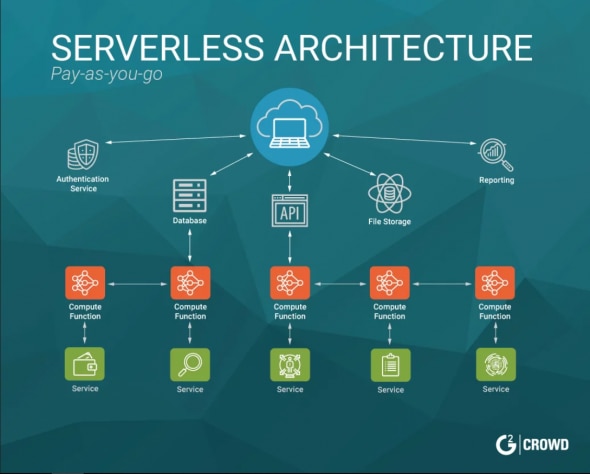
Refactoring involves redesigning applications to leverage cloud-native services like microservices, containers, and serverless computing.
Pros:
High scalability
Improved performance
Cost optimization
Cons: Time-consuming and resource-intensive
Replacing legacy applications with SaaS alternatives available on the new cloud provider.
Example: Migrating CRM systems to a SaaS-based platform.
Retire unnecessary workloads
Retain critical systems temporarily in the original cloud
This reduces migration complexity and cost.
Before migrating:
Identify dependencies
Analyze application architecture
Classify critical workloads
Estimate performance requirements
Use workload discovery tools for accurate mapping.
Create a structured plan including:
Timeline
Budget
Risk assessment
Rollback strategy
Testing phases
During migration:
Encrypt data in transit
Configure IAM roles carefully
Monitor access logs
Ensure compliance (GDPR, HIPAA, ISO standards)
Security misconfiguration is one of the most common migration risks.
Use:
Continuous replication
Blue-green deployment
Pilot testing
Parallel environments
This ensures business continuity.
Post-migration activities:
Monitor performance
Resize instances
Optimize storage tiers
Implement auto-scaling
Enable cost monitoring dashboards
Optimization ensures long-term cloud ROI.
Evaluate workloads and dependencies.
Choose rehosting, replatforming, or refactoring.
Test migration with non-critical workloads.
Transfer workloads securely.
Verify application stability and data integrity.
Ensure continuous performance improvements.
Data transfer latency
Application compatibility issues
Security risks
Cost overruns
Lack of internal expertise
Downtime during cutover
Proper planning and expert implementation significantly reduce these risks.
Avoid vendor lock-in
Improve performance
Access advanced cloud-native tools
Strengthen compliance posture
Enhance scalability
Optimize cloud spending
You should consider migrating when:
Cloud costs are rising unexpectedly
Performance limitations affect business operations
Compliance requirements change
New AI/ML or analytics features are required
Company merger or acquisition requires consolidation
Cloud-to-cloud migration is more than just moving data—it’s a strategic transformation initiative. By choosing the right migration strategy, ensuring robust security, and following structured best practices, organizations can unlock agility, scalability, and cost efficiency in multi-cloud environments.
With careful planning, testing, and optimization, your cloud transition can become a powerful driver of digital transformation.





